The 9 Best AI for Coding in 2026 (Tested & Reviewed)

The best ai for coding balances speed with quality, and the numbers reveal a troubling gap. Code generation increased by 2 to 5x. Review time increased by 91% and PR size grew by 154%. In fact, AI coding assistants have evolved beyond simple autocomplete into full development partners. But not all AI tools for software development deliver equal value. This article gets into nine leading AI programming tools, tested across real-life scenarios, to help developers choose solutions that improve productivity without compromising code quality.
Cursor

Image Source: Cursor
What It Is
Cursor operates as an AI-native code editor built on Visual Studio Code’s open-source codebase. The platform crossed USD 1.00 billion in annualized revenue and attracts developers from companies like Stripe, OpenAI, Figma, and Adobe. Cursor blends AI capabilities directly into the editing environment rather than functioning as a plugin. It retains VS Code’s familiar interface while embedding features powered by models like Claude, GPT, and Gemini.
Key Features and Capabilities
Cursor’s Agent mode handles multi-step autonomous tasks across files. It executes terminal commands and creates files based on natural language instructions. The system has Plan Mode, accessed through Shift+Tab, which researches codebases to find relevant files and asks clarifying questions. It creates detailed implementation plans before writing code.
Tab completion predicts multi-line edits with context awareness that extends beyond single-line autocomplete. Composer makes simultaneous editing across multiple files possible through natural language prompts. It updates type definitions, routes, and tests together.
The platform indexes entire codebases through semantic search and embeddings stored in vector databases. Developers can query projects with questions like “Where is the API client defined?” and receive answers based on file content, structure, and interdependencies. Cursor provides grep for exact keyword matching and fuzzy file name searches besides codebase search.
Cloud Agents run background tasks independently and handle bug fixes, refactors, or test generation while developers focus on other work. Model Context Protocol (MCP) integration allows AI to interact with Docker, databases, and local commands directly from the editor.
Project-specific behavior gets defined through cursor rules files placed in repository roots. Teams can specify frameworks, naming conventions, file structure guidelines, and testing standards that Cursor applies when generating or modifying code automatically.
Pricing Options
Cursor offers six pricing tiers with annual billing providing 20% savings across paid plans:
| Plan | Price | Key Features | Best For |
| Hobby | Free | Limited Agent requests, limited Tab completions, no credit card required | Evaluation and testing |
| Pro | USD 20.00/mo | Unlimited Tab completions, USD 20.00 credit pool, unlimited Auto mode, Cloud Agents | Solo developers |
| Pro+ | USD 60.00/mo | Everything in Pro, 3x usage multiplier on all models | Heavy AI users |
| Ultra | USD 200.00/mo | Everything in Pro, 20x usage multiplier, priority feature access | Full-time AI-native developers |
| Teams | USD 40.00/user/mo | Pro features plus shared chats/commands/rules, centralized billing, SSO, analytics | Engineering teams |
| Enterprise | Custom | Pooled usage, invoice billing, SCIM, audit logs, granular controls | Large organizations |
The credit-based system introduced in June 2025 allocates monthly credits equal to the plan price. Auto mode operates without consuming credits and is unlimited, while manually selecting premium models draws from the pool at varying rates based on model and prompt complexity.
Strengths and Limitations
Cursor excels at codebase-aware context that spans entire projects, not just individual files. Multi-file editing through Composer and Agent makes coordinated changes across components possible. Access to frontier models from OpenAI, Anthropic, Gemini, and xAI provides flexibility for different tasks.
Billing unpredictability under the credit system poses challenges for developers who use premium models manually and often. The editor can generate code with subtle logic errors or inefficient implementations that require careful review. Pricing updates have created confusion around usage limits and feature changes mid-subscription. Performance issues appear when working with very large codebases or during extended multi-turn conversations.
Ideal Use Cases
Cursor fits developers working on complex, multi-file codebases where understanding project-wide context matters. Teams building MVPs benefit from rapid feature support and coordinated refactoring across components. Full-stack developers managing both frontend and backend code use the multi-model selection to match AI capabilities to specific tasks. Legacy code maintainers employ codebase indexing to understand large repositories quickly without manual documentation review.
GitHub Copilot
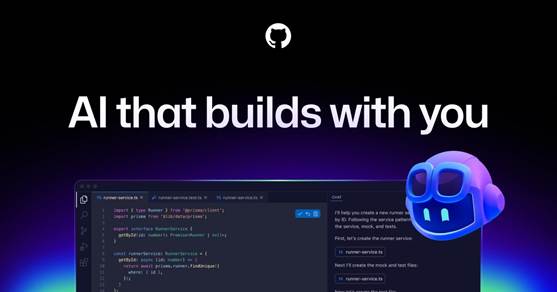
Image Source: GitHub
What It Is
GitHub Copilot functions as an AI coding assistant that GitHub and OpenAI developed together. The tool merges with Visual Studio Code, Visual Studio, JetBrains IDEs, Neovim, and Eclipse through extensions. Models that power the platform include OpenAI’s GPT series, Anthropic’s Claude, Google’s Gemini, and xAI’s Grok. Developers get flexibility to select models for different coding tasks. The system draws from training on natural language text and source code from public repositories. This includes 159 gigabytes of Python code from 54 million GitHub repositories. Developers who use the tool report up to 75% higher job satisfaction and show up to 55% increased efficiency when writing code.
Key Features and Capabilities
Inline suggestions provide autocomplete-style code completions as developers type. They extend beyond single-line predictions to entire functions. The system interprets comments, docstrings, and existing code to generate contextually relevant snippets, algorithms, and complete classes.
Copilot Chat makes natural language interactions possible for code explanations, large code section generation, and task accomplishment through keywords and skills. The @terminal agent in VS Code assists with command line operations and explains how to run specific commands without leaving the editor. Developers can access Copilot Chat on GitHub Mobile, and Windows Terminal besides IDE chat.
Pull request summaries generate detailed explanations of code changes, impacted files, and review focus areas through Enterprise plan integration. The system creates commit messages by analyzing staged changes through sparkle icons in source control interfaces.
GitHub Copilot CLI extends assistance to terminal environments and helps with shell commands, Git operations, and gh cli commands. Developers can highlight error messages in terminals for contextual explanations and suggested fixes which reduces debugging friction.
Code review capabilities provide AI-generated suggestions through the review process. Inline fix options allow developers to right-click highlighted code and select ‘Fix using Copilot’ for immediate corrections. Documentation generation follows language-specific formats and produces Docstrings for Python, JSDoc for JavaScript, and Javadoc for Java.
Pricing Options
| Plan | Monthly Price | Features | Target Users |
| Free | USD 0.00 | 2000 completions, 50 chat requests | Individual developers |
| Student | USD 0.00 | Unlimited completions, premium models, 300 premium requests | Verified students |
| Pro | USD 10.00 | Unlimited completions, premium models, 300 premium requests | Individual developers, freelancers |
| Pro+ | USD 39.00 | Pro features plus 1500 premium requests, full model access | AI power users |
| Business | USD 19.00/user | Pro features, centralized management, policy control | Organizations |
| Enterprise | USD 39.00/user | Business features, codebase indexing, custom models | Enterprises |
The Free tier limits users to 2000 completions and 50 chat requests monthly. Pro+ has five times more premium requests than Pro and provides access to all available models in Copilot Chat.
Strengths and Limitations
Studies show tangible productivity improvements. Developers who used Copilot completed tasks 55% faster than those without the tool. Success rates reached 78% compared to 70% for non-users. Engineers reported average time savings of 5-10% in controlled studies, while another survey found developers saved about 30 minutes per day.
The tool excels at generating boilerplate code, writing tests, debugging syntax, and providing syntax hints for unfamiliar languages. Multi-language support and smooth IDE integration reduce friction when switching between tech stacks.
Limitations exist around dependency risks. Heavy reliance may diminish problem-solving skills, especially among beginners. Code quality varies. Suggestions require validation for relevance, optimization, and security vulnerabilities. The system doesn’t deal very well with full context understanding beyond immediate code and sometimes misses business logic or specific project requirements. Intellectual property concerns persist around code trained on public repositories.
Ideal Use Cases
GitHub Copilot serves developers who write repetitive code patterns and boilerplate structures. It automates tedious entity definitions and database schemas. Test generation benefits from natural language descriptions converted into test frameworks and reduces the manual effort to reach coverage targets. Beginners who learn new programming languages use syntax suggestions and best practice examples as on-the-go mentorship. Teams that maintain large codebases use repository explanations and code documentation features to understand unfamiliar sections quickly. Solo developers and small teams gain an additional virtual team member for suggestions and solutions during development cycles.
Tabnine
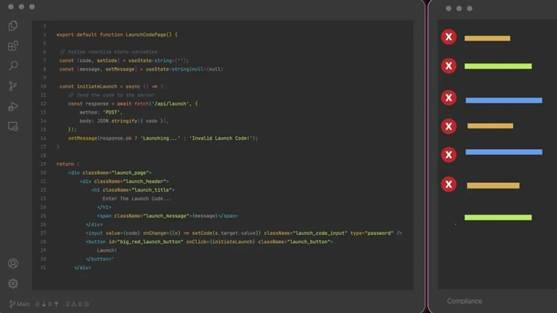
Image Source: www.tabnine.com
What It Is
Tabnine positions itself as a privacy-focused AI coding assistant that integrates with leading IDEs and keeps source code under developer control. The platform has over 9 million VS Code installations and more than one million active developers. It supports VS Code, JetBrains products, Eclipse and Visual Studio. Tabnine offers deployment flexibility through SaaS endpoints, single-tenant VPC environments, or fully on-premises installations using Dell PowerEdge servers with NVIDIA GPUs for air-gapped workloads. This sets it apart from cloud-only alternatives.
Key Features and Capabilities
The platform analyzes active files and connected repositories to deliver context-aware suggestions that range from single-line completions to full functions, tests and documentation strings. Developers receive inline code suggestions that adapt with each typed character. This reduces the need to look up syntax or function definitions. Full-function completions appear after function declarations if descriptive names indicate intent. Natural language comments convert into executable code on subsequent lines.
IDE-native chat enables developers to switch between GPT, Claude, Qwen, or Tabnine’s protected models for tasks like refactoring, test generation, or error diagnosis. The code review agent automates pull-request analysis against custom architecture, security and style rules. This frees senior engineers from repetitive lint checks. Image-as-context functionality converts Figma mockups, ER diagrams, or flowcharts into React components, SQL scripts, or orchestration code that follows existing patterns.
Enterprise administrators can register private endpoints for models like Llama 3, Claude 4, or Gemini 2.5 through the bring-your-own-LLM feature. Provenance controls flag license conflicts and block non-compliant code snippets before insertion. The platform trains its models exclusively on open-source code with permissive licenses such as MIT or Apache 2.0. This reduces intellectual property risks.
Pricing Options
| Plan | Monthly Price | Key Features | Target Users |
| Dev Preview | USD 0.00 | Simple completions, foundational AI agents, local IDE context | Individuals, students |
| Dev | USD 9.00/user | AI chat, full-function completion, natural language to code | Professional developers, small teams |
| Enterprise | USD 39.00/user | Advanced agents, codebase-wide context, VPC/on-prem deployment, IP indemnification | Large organizations, regulated industries |
The Dev plan has a 14-day free trial, while Enterprise pricing requires annual commitment. Deployment options span SaaS infrastructure, virtual private clouds, on-premises Kubernetes clusters and completely offline installations.
Strengths and Limitations
Tabnine excels at speed and deployment control. Teams can choose where code context resides. Zero data retention policies ensure proprietary code never trains public models, while IP indemnification protects Enterprise customers from copyright claims. The platform performs best on routine implementation work, test support and common framework patterns where code structure follows predictable forms.
Suggestions require review, as AI-generated code may introduce subtle bugs or inefficient implementations. Running models locally consumes processing power that can slow older machines. The system understands codebase context really well but lacks awareness of project requirements documented in external tools like Jira or Confluence.
Ideal Use Cases
Teams measure value through time from typing start to first accepted completion, review duration on AI-assisted pull requests, multiline suggestion acceptance rates and manual edits required before merge. The platform suits organizations handling legacy code maintenance, accelerating unit test writing, or reducing onboarding times through private model fine-tuning that helps new hires understand proprietary libraries. Regulated industries in finance, healthcare and government benefit from air-gapped deployments that guarantee code never leaves private networks.
Replit

Image Source: Replit
What It Is
Replit is a browser-based IDE supporting multiple programming languages without downloads or configuration. The platform evolved from a simple code editor into an AI-powered software creation ecosystem. Replit released Agent in September 2024, an autonomous AI system that builds complete applications from natural language descriptions. The company reached USD 9.00 billion valuation by March 2026 and grew annualized revenue to USD 253.00 million from USD 2.80 million in early 2024. Replit announced a partnership with Microsoft in July 2025 to integrate its platform with Azure cloud infrastructure and the Azure Marketplace.
Key Features and Capabilities
Replit Agent functions as an autonomous development system that accepts natural language prompts and builds entire applications including user interfaces, logic, databases, and authentication. The Agent works independently for up to 200 minutes, writes tests, and debugs its own code. It can create other agents and automations. Developers can screenshot existing apps or websites, upload them, and Agent will recreate the functionality.
Ghostwriter provides inline AI assistance as developers type and predicts multiple lines of logic based on project context. The system offers proactive debugging with a “Fix with AI” button that analyzes stack traces, identifies root causes, and provides one-click patches. Code explanation features break down complex logic into plain English for learning purposes.
Multiple developers can work simultaneously with live cursor positions, shared terminal access, and voice chat integration. The platform supports over 50 programming languages with automatic package installation and built-in framework support. Deployment options include one-click static site hosting, reserved VM deployments with 99.9% uptime, and autoscaling dynamic servers.
AI Integrations provide access to 300+ models from GPT, Gemini, Claude, Llama, Grok, and Mistral without requiring API keys or separate accounts. The Agent selects appropriate models and handles provisioning, wiring, and billing integration automatically.
Pricing Options
| Plan | Monthly Price | Key Features | Target Users |
| Starter | Free | Limited daily credits, 1 published app, simple AI tier, 1,200 development minutes | Beginners, testing |
| Core | USD 20.00-25.00 | USD 25.00 monthly credits, unlimited apps, autonomous builds, up to 5 collaborators | Solo builders |
| Pro | USD 100.00 | Tiered credits with discounts, up to 15 builders, priority support, credit rollover | Small teams |
| Enterprise | Custom | SSO, SCIM provisioning, up to 64 vCPUs, custom limits, dedicated support | Large organizations |
Replit uses effort-based billing where AI interactions consume credits from monthly pools. Three modes control consumption speed: Economy Mode for cost optimization, Power Mode for complex tasks, and Turbo Mode (Pro/Enterprise only) that responds 2.5x faster but consumes up to 6x more credits.
Strengths and Limitations
Replit eliminates setup friction entirely and allows developers to start coding from blank browser tabs in seconds. The Agent handles database migrations, API boilerplate, and CSS resets autonomously. This enables non-technical founders to build MVPs without hiring developers. Integrated hosting, PostgreSQL databases, and authentication combine into single-platform deployment. The mobile app supports full-stack development on iPads and smartphones with near-desktop parity.
But credit costs scale unpredictably at the time Agent loops attempt multiple bug fixes and potentially burn several dollars in minutes. AI can become overconfident and suggest outdated libraries or break features while fixing bugs. Large monorepos suffer from browser-based latency as codebases grow complex. Moving projects off Replit requires substantial refactoring since the AI uses platform-specific configurations. The platform requires constant internet connectivity and disappears entirely at the time connections drop.
Ideal Use Cases
Replit serves non-technical founders building custom CRMs, inventory management systems, and business tools through natural language prompts. Students learn coding without setup friction while teachers assign projects through shareable links. Entrepreneurs in developing countries access development capabilities without expensive hardware and require only internet connections. Teams can build web applications, REST and GraphQL APIs, AI-powered chatbots, and content summarizers using integrated model access. Educators can create interactive tutorials where AI helps students fix syntax errors in real time.
Claude Code
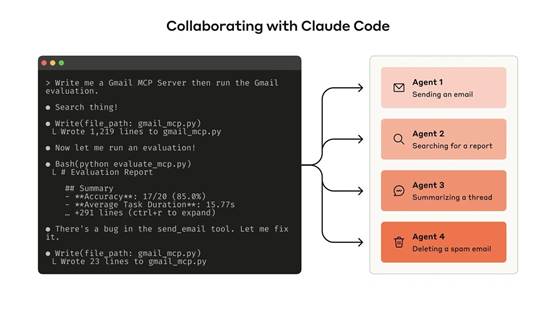
Image Source: Anthropic
What It Is
Claude Code runs as an agentic coding system in terminal, IDE, desktop app, and browser environments. The system reads entire codebases, makes changes in multiple files, runs tests, and delivers committed code on its own. Traditional autocomplete tools don’t work this way. Engineers at Anthropic now write the majority of code using Claude Code and change their focus to architecture decisions and continuous orchestration while managing multiple agents in parallel.
Key Features and Capabilities
The platform operates at the project level and plans approaches in multiple files, executes changes, runs tests, and iterates on failures without human input. Files placed in repository roots define coding standards, architecture decisions, preferred libraries, and review checklists that Claude reads at session start. Plan Mode researches codebases to find relevant files, asks clarifying questions, and creates step-by-step plans before modifying code.CLAUDE.md
Model Context Protocol integration connects Claude to external data sources like Google Drive, Jira, and Slack. Skills package repeatable workflows teams can share, while Hooks fire shell commands at core lifecycle moments. Subagents tackle subtasks in parallel, with a lead agent coordinating work and merging results. Compaction summarizes older conversation turns as sessions grow and preserves decisions while dropping low-signal exchanges.
Pricing Options
Claude Code operates through token-based billing without fixed per-seat costs. Pricing depends on plan type, model selection, and codebase size:
| Plan | Monthly Cost | Usage Model | Best For |
| Pro | USD 20.00 | 44,000 tokens per 5-hour period | Solo developers |
| Teams Premium | USD 100.00-125.00/seat | 6.25x more usage than Pro | Development teams |
| Enterprise | Custom | API rates plus per-user seat fee | Large organizations |
| API Pay-as-you-go | Variable | <citation index=”17″ link=”https://platform.claude.com/docs/en/about-claude/pricing” similar_text=”### Batch processing The Batch API allows asynchronous processing of large volumes of requests with a 50% discount on both input and output tokens. Model | Batch input |
Strengths and Limitations
Stripe deployed Claude Code to 1,370 engineers and completed a 10,000-line Scala-to-Java migration in four days. The work was estimated at ten engineer-weeks. Ramp cut incident investigation time by 80%, while Wiz migrated a 50,000-line Python library to Go in roughly 20 hours versus an estimated two to three months manually. Rakuten reduced average delivery time for new features from 24 working days to 5.
The permission system asks for approval before every action and disrupts flow during deep work. Developers report spending USD 100.00/hour when running at full throttle. Code quality varies with complex business logic and requires careful review for race conditions and edge cases.
Ideal Use Cases
Claude Code suits use cases where financial institutions analyze regulatory compliance in existing code and implement security improvements in distributed systems. Data science teams use it to convert Jupyter notebooks into production-ready Metaflow pipelines and save 1-2 days per model. DevOps teams manage Nagios configurations and Docker orchestration through natural language instructions.
Windsurf

Image Source: Windsurf
What It Is
Codeium developed Windsurf as an AI-native code editor built from the ground up for agentic development workflows rather than modernizing existing editors with AI features. OpenAI acquired Codeium and Windsurf for about USD 3.00 billion in May 2025. This positioned them against Microsoft’s GitHub Copilot and tools like it. Over one million developers worldwide trust the platform. It runs on a Visual Studio Code foundation and treats AI as a first-class collaborator capable of autonomous multi-step execution.
Key Features and Capabilities
Cascade serves as the centerpiece agentic system with awareness spanning whole codebases, not just open files. The agent executes sequences that include feature additions, cross-file bug fixes, module refactoring and test generation. It runs terminal commands and checks output on its own. Flows enable fluid transitions between copilot mode for inline suggestions and agent mode for autonomous actions. You don’t need to switch modes manually.
Supercomplete predicts developer intent beyond next-line autocomplete and generates complete functions with docstrings tailored to codebase context. The platform supports Claude (Anthropic), GPT-4, GPT-4o (OpenAI), Gemini and Codeium’s internally-trained models. Users can switch based on what the task requires. Model Context Protocol integration connects custom tools and services through one-click MCP server setup. Devin operates as an autonomous cloud agent that handles debugging, testing and deployment tasks. Developers can continue local work or close their laptops.
Pricing Options
| Plan | Monthly Price | Key Features | Target Users |
| Free | USD 0.00 | Light quota, limited models, unlimited inline edits | Tool evaluation |
| Pro | USD 20.00 | Standard quota, frontier models, Devin sessions | Individual developers |
| Max | USD 200.00 | Heavy quota, priority access | Power users |
| Teams | USD 40.00/user | Centralized billing, admin dashboard, analytics | Organizations |
| Enterprise | Custom | SSO, RBAC, hybrid deployment | Large enterprises |
Windsurf shifted from credit-based billing to usage quotas that refresh daily and weekly in March 2026. Paid plans allow extra usage purchases at API pricing when quotas run out.
Strengths and Limitations
Developers report 70%+ productivity increases. Migration tasks that once took full days now take hours. The platform excels at automated code review, test script generation and refactoring through Supercomplete. Users praise the easy-to-use UX compared to alternatives, especially the preview setup and MCP configuration simplicity.
Limitations include occasional overconfidence that generates changes without enough validation and context understanding gaps on complex business logic. Model availability varies by region and plan tier.
Ideal Use Cases
Windsurf fits large-scale refactoring projects where AI identifies legacy patterns and generates modern replacements. Teams use it for automated testing integration, bug diagnosis with safe change proposals and onboarding acceleration through contextual codebase explanations. The platform serves developers who manage full-stack applications that require cross-framework component generation and datetime/timezone debugging.
Amazon Q Developer

Image Source: AWS
What It Is
Amazon Q Developer emerged in April 2024 as the rebrand and expansion of AWS CodeWhisperer. It added autonomous agents and conversational AI for AWS resource management. The platform is built on Amazon Bedrock with training on 17 years of AWS cloud experience. It covers the entire software development lifecycle to build, secure and optimize applications on or off AWS. The system integrates with Visual Studio Code, JetBrains IDEs, Visual Studio and Eclipse. It supports SOC, ISO, HIPAA and PCI compliance requirements.
Key Features and Capabilities
Autonomous agents execute multi-step tasks including feature implementation and code refactoring. They analyze repositories, create branches and explain changes. Custom rules stored in amazonq/rules folders establish coding standards applied in team interactions. Code transformation capabilities handle Java 8 to Java 17 migrations with minimal manual input. AWS Console integration answers account-level questions and generates CLI commands. BT Group accepts 37% of Amazon Q’s code suggestions. National Australia Bank reports 50% acceptance rates.
Pricing Options
| Tier | Monthly Price | Agentic Requests | Code Transformation | Key Features |
| Free | USD 0.00 | 50/month | 1,000 lines/month | IDE/CLI access, reference tracking |
| Pro | USD 19.00/user | Included with limits | 4,000 lines/month pooled | <citation index=”28″ link=”https://aws.amazon.com/q/developer/pricing/” similar_text=”Feature |
Strengths and Limitations
The platform excels at AWS-specific guidance but delivers limited value outside AWS ecosystems. Poor suggestions can confuse beginners. Telemetry requires Amazon S3 bucket configuration versus built-in analytics.
Ideal Use Cases
Amazon Q Developer serves AWS-centric teams managing cloud-native systems. It works well for organizations that need enterprise governance frameworks. Developers modernizing legacy Java applications through automated upgrades will find it useful.
Aider

Image Source: YouTube
What It Is
Paul Gauthier built Aider as a terminal-based AI pair programming tool that connects local Git repositories to LLMs including Claude 3.7 Sonnet, DeepSeek R1 & Chat V3, OpenAI o1, o3-mini, and GPT-4o. Aider runs directly in command-line environments where developers manage code through Git workflows instead of operating as an IDE extension.
Key Features and Capabilities
Aider creates repository maps covering function signatures and file structures. This enables intelligent multi-file edits that respect project architecture. The system commits changes automatically with descriptive messages and integrates naturally with standard Git tools for diffs and rollbacks. Voice input lets developers request features or bug fixes verbally. Aider implements changes based on these requests. The platform works with Python, JavaScript, Rust, Ruby, Go, C++, PHP, HTML, CSS and dozens more languages. Lint and test automation runs after every change. Aider fixes problems that test suites detect.
Pricing Options
Aider costs nothing as free open-source software. Developers pay LLM providers directly at API rates. Typical costs range from USD 0.01-0.10 per feature implementation.
Strengths and Limitations
Git-native workflows provide commit-level traceability and immediate rollback capabilities. Model flexibility allows switching between providers mid-session without vendor lock-in. Terminal-only interfaces create barriers for developers who prefer GUI. Context management requires manual file specification.
Ideal Use Cases
Aider serves terminal-native developers who value Git-first development, teams that need transparent token usage control, and polyglot programmers who switch editors frequently.
Comparison Table
Comparison Table: The 9 Best AI for Coding in 2026
| Tool | Type | AI Models | Free Tier | Individual Price | Enterprise Price | Key Strengths | Main Use Cases | IDE Support |
| Cursor | AI-native code editor | Claude 3.5 Sonnet, GPT-4o, Gemini | Free (Hobby plan) | USD 20.00/mo (Pro) | Custom (Enterprise) | Codebase-aware context, multi-file editing, Agent mode for autonomous tasks | Complex multi-file codebases, MVP building, full-stack development, legacy code maintenance | Built on VS Code |
| GitHub Copilot | AI coding assistant | GPT series, Claude, Gemini, Grok | Free (2000 completions, 50 chat requests) | USD 10.00/mo (Pro) | USD 39.00/user/mo | 55% faster task completion, smooth IDE integration, multi-language support | Boilerplate code generation, test writing, learning new languages, large codebase maintenance | VS Code, Visual Studio, JetBrains, Neovim, Eclipse |
| Tabnine | Privacy-focused AI assistant | GPT-4o, Claude 3.5 Sonnet, Qwen, proprietary models | Free (Dev Preview) | USD 9.00/user/mo (Dev) | USD 39.00/user/mo | Privacy controls, zero data retention, VPC/on-prem deployment, IP indemnification | Legacy code maintenance, regulated industries, air-gapped deployments, unit test acceleration | VS Code, JetBrains, Eclipse, Visual Studio |
| Replit | Browser-based IDE with AI | GPT, Gemini, Claude, Llama, Grok, Mistral (300+ models) | Free (Starter) | USD 20.00-25.00/mo (Core) | Custom (Enterprise) | Zero setup friction, autonomous Agent builds complete apps, integrated hosting and deployment | Non-technical founders building MVPs, students learning to code, web app development | Browser-based (mobile app available) |
| Claude Code | Agentic coding system | Claude models | N/A | USD 20.00/mo (Pro) | Custom (Enterprise) | Project-level autonomous operation, reads entire codebases, parallel subagents | Legacy system modernization, large-scale migrations, data science pipeline conversion | Terminal, IDE, desktop app, browser |
| Windsurf | AI-native code editor | Claude, GPT-4, GPT-4o, Gemini, Codeium models | Free | USD 20.00/mo (Pro) | Custom (Enterprise) | 70%+ productivity increases, Cascade agentic system, Supercomplete predictions | Large-scale refactoring, automated testing, full-stack applications, onboarding acceleration | Built on VS Code |
| Amazon Q Developer | AWS-focused AI assistant | Amazon Bedrock models | Free (50 agentic requests/mo) | USD 19.00/user/mo (Pro) | Included in Pro | AWS-specific guidance, code transformation (Java migrations), SOC/ISO/HIPAA compliance | AWS-centric teams, cloud-native systems, Java application modernization | VS Code, JetBrains, Visual Studio, Eclipse, AWS Console |
| Aider | Terminal-based AI pair programmer | Claude 3.7 Sonnet, DeepSeek R1 & Chat V3, OpenAI o1, o3-mini, GPT-4o | Free (open-source) | Pay LLM API costs (USD 0.01-0.10 per feature) | Pay LLM API costs | Git-native workflows, commit-level traceability, model flexibility, voice input | Terminal-native developers, Git-first development, polyglot programmers | Terminal/command-line (works with any editor) |
Additional Pricing Details
| Tool | Teams Plan | Notable Features |
| Cursor | USD 40.00/user/mo | Credit-based system, unlimited Auto mode, Cloud Agents |
| GitHub Copilot | USD 19.00/user/mo (Business) | Pull request summaries (Enterprise), CLI support |
| Tabnine | N/A | 14-day free trial on Dev plan, bring-your-own-LLM option |
| Replit | USD 100.00/mo (Pro for teams) | Effort-based billing, credit rollover on Pro+ |
| Claude Code | USD 100.00-125.00/seat (Teams Premium) | Token-based billing, 6.25x more usage than Pro |
| Windsurf | USD 40.00/user/mo | Daily/weekly quota refresh, MCP integration |
| Amazon Q Developer | Included in Pro | Custom rules, 37-50% acceptance rates reported |
| Aider | N/A | Open-source, no subscription fees |
Reported Productivity Metrics
| Tool | Productivity Improvement | Source |
| GitHub Copilot | 55% faster task completion, 75% higher job satisfaction | Studies cited in article |
| Tabnine | 9M+ VS Code installations, 1M+ active developers | Platform statistics |
| Replit | USD 253M annualized revenue, USD 9B valuation | Company metrics (March 2026) |
| Claude Code | 80% reduction in incident investigation (Ramp), 10,000-line migration in 4 days (Stripe) | Customer case studies |
| Windsurf | 70%+ productivity increases reported | User reports |
| Amazon Q Developer | 37-50% code suggestion acceptance rates | BT Group, National Australia Bank |
Conclusion
The AI coding tools world offers distinct solutions for different development contexts. GitHub Copilot and Cursor excel at general-purpose development, while Tabnine prioritizes privacy for regulated industries. Replit removes barriers for non-technical builders. Claude Code and Windsurf handle enterprise-scale refactoring. Amazon Q Developer serves AWS-centric teams, and Aider appeals to terminal-native developers seeking Git-first workflows.
Developers should match capabilities to actual workflow requirements instead of searching for a single “best” tool. Teams handling sensitive codebases benefit from Tabnine’s air-gapped deployments. Solo developers building MVPs gain velocity through Replit’s autonomous Agent. The right choice depends on your stack and deployment constraints. You must weigh whether productivity gains justify subscription costs against code review overhead.
For organizations evaluating how to apply AI-assisted development in a secure, scalable, and business-focused way, Brisa America can help turn these tools into measurable software outcomes. With more than 35 years of experience in custom software development, software testing, system integration, AI agents, automation, and technical consulting, Brisa supports companies that need more than code generation—they need reliable architecture, quality assurance, integration strategy, and long-term maintainability. If your business is exploring AI for coding, modernization, or custom software development, contact Brisa America to discuss how the right AI-enabled development approach can accelerate delivery while maintaining security, quality, and operational control.